Private clipboard manager for macOS.
Hutchlet remembers everything you copy — text, links, images, files and commands — while keeping passwords, API keys and secrets encrypted on your Mac.
macOS 14+ · Apple Silicon · One-time purchase · No account, no tracking, no network.
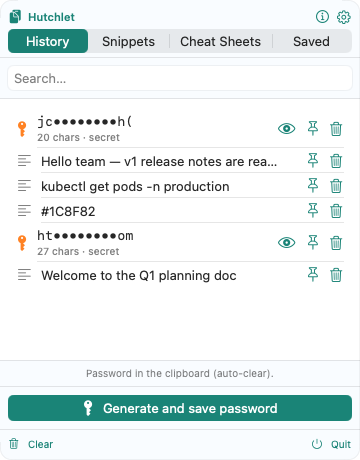
Everything you copy, ready when you need it
The default macOS clipboard remembers just one thing at a time. Hutchlet remembers it all — and adds a few productivity tools that earn their place in your menu bar.
Unlimited history
Text, links, images, and files — all captured automatically and searchable in a flash.
Summon at the cursor
A quick shortcut (⌘⇧V) or a mouse gesture pops the panel right where you’re working — pick an item and it pastes straight back.
Secrets, kept safe
Passwords, API keys, and card numbers are spotted automatically, encrypted on your Mac, masked as ab••••yz, and revealed only behind Touch ID.
Password generator
Create a strong password or passphrase, see its entropy, and drop it straight into the secure clipboard — it auto-clears a few seconds later.
Cheat Sheets
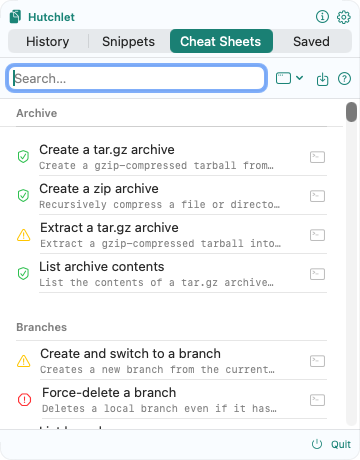
Ready-made commands with parameters. Fill in the fields, preview the exact result, then copy or paste — you decide when to run it.
Snippets
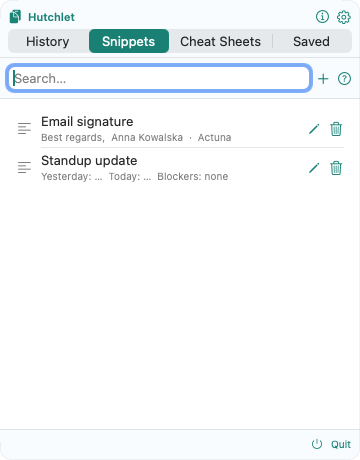
Save the text you reuse — replies, signatures, boilerplate. Add {fields} to fill in on paste. Organise them into folders.
Stop retyping the commands you run all day
Cheat Sheets turn the commands, scripts, and URLs you reach for over and over into fill-in-the-blank templates. Pick a template, fill its parameters, preview the rendered command, and choose how it’s delivered — copy, paste, or open a link.
- Live preview. See the exact command, with values substituted, before anything happens.
- Risk-aware. Every template carries a risk badge — from Safe to Destructive — and the riskiest actions need an explicit confirmation.
- Never runs behind your back. Hutchlet prepares the command; you decide when to press Enter.
- Shareable. Save a filled-in sheet and hand it to a teammate as a portable link.
# A template…
ping -c ${count} "${host}"

# …you fill in
count = 8
host  = 8.8.8.8

# …and preview before it goes anywhere
ping -c 8 "8.8.8.8"
Built for people who copy important things all day
Commands, API responses, tokens, replies, links — if your clipboard does real work, Hutchlet was made for you.
👩💻 Developers
Save commands, API responses, tokens and snippets. Turn the terminal commands you retype every day into fill-in Cheat Sheets with a live preview — and keep API keys out of plain-text history.
🛠️ Sysadmins & DevOps
Preview every command before it goes anywhere. Risk badges flag destructive operations, and production secrets stay encrypted behind Touch ID instead of sitting in searchable history.
🎧 Support & operations
Reuse replies, signatures and diagnostics as snippets with fill-in fields — and hand a teammate a ready-to-run command as a portable link.
🔐 Privacy-conscious Mac users
Keep clipboard history local and searchable, with secrets encrypted where it matters — no account, no cloud, no analytics.
One price, nothing leaves your machine
The clipboard you already have forgets; the cloud ones remember on someone else’s server. Hutchlet does neither.
The built-in macOS clipboard
One item at a time. Copy again and it’s gone. No search, no secrets, no history.
Subscription clipboard apps
Your history synced to someone’s cloud — and a fee every month to keep it.
Hutchlet
Everything, searchable, secrets encrypted, on your Mac. One price. Nothing leaves your machine.
Your clipboard never leaves your Mac
Hutchlet has no servers, no accounts, no analytics, and no tracking, and makes no network calls with your clipboard data — the current build has no networking entitlement at all. Secrets are encrypted locally with Apple CryptoKit and unlocked with Touch ID. And because the source is published, you don’t have to take our word for it.
See it in action
Real screenshots from the app — your history and secrets, the Cheat Sheets catalog, and your snippets.
Frequently asked questions
Does Hutchlet send my clipboard data anywhere?
No. Hutchlet stores clipboard history locally on your Mac and makes no network calls with your clipboard data — the current build has no networking entitlement at all.
How are passwords and API keys protected?
Hutchlet detects secrets such as passwords, API keys and card numbers, masks them in the list, encrypts them locally with Apple CryptoKit and reveals them only after Touch ID authentication.
Is Hutchlet a subscription?
No. Hutchlet is a one-time purchase on the Mac App Store — no subscription, no ads, no upsells. Every feature is unlocked from day one.
What do I need to run Hutchlet?
macOS 14 (Sonoma) or later on an Apple Silicon Mac. Touch ID is recommended for revealing secrets. No account and no network connection are required.
Is Hutchlet open source?
The source is published so anyone can audit how the app behaves — Hutchlet is source-available, though the licence is not open source.
When can I get Hutchlet?
Hutchlet is in the final stretch before its first public release on the Mac App Store. Email us from the download page and we’ll tell you the moment it ships.
Learn Hutchlet
Documentation for every feature, plus how-to guides for working faster.
📚 Documentation
Reference for clipboard history, secrets, the password generator, Cheat Sheets, Snippets, Saved Sessions, settings, and the privacy model.
⚡ How-to guides
Practical workflows: paste the right thing every time, stop retyping commands, generate strong passwords safely, and build a team command playbook.
Give your clipboard a cosy little hutch
Copy freely — it all stays on your Mac. Hutchlet lives quietly in your menu bar and is ready the moment you need it.