Docs › Cheat Sheets
Cheat Sheets
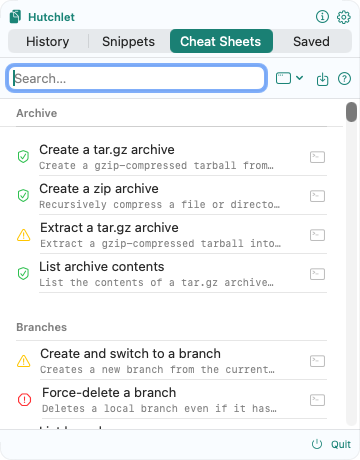
Cheat Sheets are ready-made commands with parameters. Fill in the fields, preview the exact result, then copy or paste — you decide when to run it. They turn the commands you reach for all day into safe, fill-in-the-blank templates.
Hutchlet never runs a command for you by surprise. It renders the command and delivers it the way you choose; running it is your call.
The flow
Pick a template
Browse the catalog, grouped by category, each tagged with a risk and target badge.
Fill in the fields
A form is built from the template’s variables — text, numbers, toggles, dropdowns, paths, or secrets.
Preview
See the final command with your values substituted and safely quoted, before anything happens.
Deliver
Choose how it’s handed over: copy, paste, open a link, and so on.
Risk levels
Every template carries a risk level that drives its badge and how carefully it’s gated:
The riskier the action, the more friction: destructive templates won’t auto-press Enter, and a security-bypass template needs an explicit “I understand, continue.” A command that looks like it targets a production environment asks for extra confirmation.
Delivery modes
| Mode | What happens |
|---|---|
| Copy | Copies the rendered command to the clipboard. |
| Paste without Enter | Pastes it into the target without running it. |
| Paste & Enter | The most restricted mode — never the default, disabled for destructive templates. Only for low-risk, trusted commands. |
| Open link | Launches a URL. |
| Send shortcut | Sends a key sequence. In the App Store build this is shown as guided steps instead. |
| Guided steps | Step-by-step instructions for things that can’t be automated. |
Targets & context
A template declares where it’s meant to be used — terminal, browser, browser DevTools, editor, clipboard-only, guided, automation — so a shell command can’t be pasted into a mail field by accident. If the active window doesn’t match, Hutchlet copies instead of pasting, or blocks the paste:
- “Active field looks like a password — paste is blocked.”
- “This template targets a terminal — copy it instead of pasting here.”
Parameters & validation
Variables can be string, number, boolean, select, secret, or path. Values can be typed, picked from presets, or pulled from the clipboard, the current selection, or history. Hutchlet validates as you go: number min/max, regex formats, and forbidden paths (you can’t point a dangerous template at / or /etc). Some values require a manual “I confirm.”
Secrets stay secret. A secret variable is never saved to value history, and a sheet that contains one can’t be shared as a link.
Trust & quarantine
Built-in templates are local; ones you import start quarantined. You can copy or share a quarantined template, but auto-paste and execution are blocked until you review and Trust it. Templates can also be trusted, team, signed, untrusted, or blocked.
Dry-run & private audit
- Dry-run — a template can offer a safe variant (for example a
diffinstead of anapply). - Audit — optionally log template uses privately on this Mac. It records only the template, risk, app, and time — never the command or your values.