A truly private clipboard manager for Mac.
Your clipboard holds passwords, tokens and things you’d never post publicly. Hutchlet keeps its history on your Mac — no cloud, no account, no analytics — and you don’t have to take our word for it.
macOS 14+ · Apple Silicon · One-time purchase · No account, no tracking, no network.
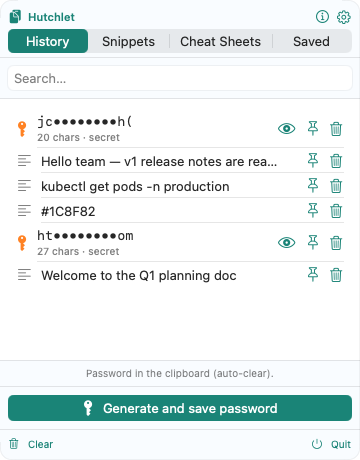
Privacy you can verify, not just believe
Most privacy promises live in a marketing page. Hutchlet’s live in the build itself.
No network — by construction
The current build has no networking entitlement, so it cannot make network calls at all — with your clipboard data or anything else. That’s a property of the app, not a policy.
Source published for audit
The source code is published so anyone can confirm exactly how Hutchlet behaves. It’s source-available (the licence is not open source) — but for privacy, reading is believing.
Secrets encrypted where it matters
Passwords, API keys and card numbers are detected automatically, masked as ab••••yz, encrypted with Apple CryptoKit and revealed only after Touch ID.
You control what’s kept
Smart retention keeps your most recent items and lets the rest expire. Skip large clips, keep secrets out of searchable history, and clear everything with one click.
Where your history lives matters
The built-in macOS clipboard
One item at a time. Copy again and it’s gone. No search, no secrets, no history.
Cloud clipboard apps
Convenient — but your passwords and tokens travel to someone else’s server under someone else’s policy.
Hutchlet
Everything, searchable, secrets encrypted, on your Mac. One price. Nothing leaves your machine.
Privacy questions, answered
Does Hutchlet sync my clipboard to the cloud?
No. There is no cloud, no sync and no account. Clipboard history is stored locally on your Mac, and the current build has no networking entitlement, so it cannot make network calls at all.
How can I verify that Hutchlet makes no network calls?
Two ways: the app’s entitlements can be inspected in the shipped build — there is no networking entitlement to find — and the source code is published, so anyone can audit exactly how the app behaves.
What happens to passwords I copy?
Hutchlet detects secrets such as passwords, API keys and card numbers, masks them in the list and stores them encrypted with Apple CryptoKit. They are revealed only after Touch ID authentication, and everything stays on your Mac.
Does the Hutchlet website track me?
No. The website uses no cookies, no analytics and no trackers, and loads no third-party scripts, fonts or embeds. The only things stored in your browser are your theme and language preferences.
Copy freely — it all stays on your Mac
Searchable history, encrypted secrets and safe command templates, in one quiet menu-bar app.