A snippet manager for your Mac.
Stop retyping the same replies, signatures, boilerplate and code. Save them once as snippets, add fill-in fields, and paste the right one anywhere with a shortcut — all stored on your Mac.
macOS 14+ · Apple Silicon · One-time purchase · No account, no tracking, no network.
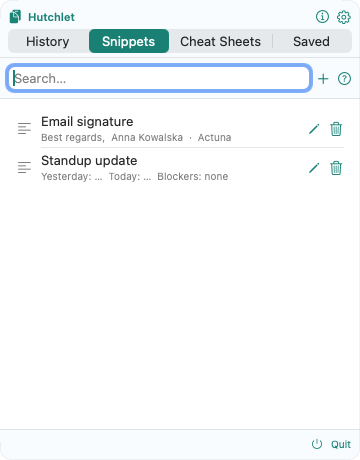
Reusable text, exactly where you need it
Fill-in fields
Add {fields} to a snippet — a name, a date, a ticket number — and fill them in as you paste, so one snippet covers many situations.
Organised in folders
Group snippets into folders and find any of them with a quick search. Replies, code blocks, signatures and templates all live one shortcut away.
Paste into any app
Summon the panel with ⌘⇧V or a mouse gesture, pick a snippet, and it pastes straight into the app you’re working in.
Snippets, clipboard history and safe command templates — together
Hutchlet is also a full clipboard manager: a searchable history of everything you copy, plus Cheat Sheets that turn commands into fill-in templates. Secrets you paste are detected and encrypted behind Touch ID, so nothing sensitive sits in the open.
Snippet manager questions
What’s the difference between snippets and clipboard history?
History is captured automatically — everything you copy. Snippets are text you save on purpose to reuse, with optional fill-in fields and folders. Hutchlet gives you both in one menu-bar app.
Can snippets have variables I fill in?
Yes. Add {fields} anywhere in a snippet and you’ll be prompted to fill them in when you paste — great for replies, templates and commands.
Are my snippets private?
Completely. Snippets live only on your Mac; the current build has no networking entitlement, and detected secrets are encrypted with Apple CryptoKit and revealed only behind Touch ID.
Write it once, paste it forever
Snippets with fill-in fields, a searchable clipboard history and encrypted secrets — in one quiet menu-bar app.