Keep API keys out of your clipboard history.
You copied a token today. Most clipboard tools store it like any other text — in plain sight, synced, searchable. Hutchlet detects secrets, masks them, and encrypts them on your Mac behind Touch ID.
macOS 14+ · Apple Silicon · One-time purchase · No account, no tracking, no network.
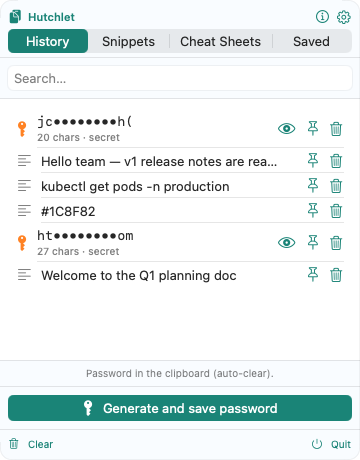
Why the clipboard is a soft spot for secrets
Passwords, API keys, tokens and card numbers pass through your clipboard all day. A basic clipboard manager keeps them as plain text you can scroll and search; a cloud one sends them to someone else’s server. Either way, a secret you copied once can linger where it shouldn’t.
How Hutchlet protects what you copy
Detected automatically
Passwords, API keys, tokens and card numbers are recognised on-device with deterministic rules — no AI, no upload — and flagged as secrets the moment they land in history.
Masked and encrypted
Secrets show as ab••••yz in the list and are encrypted at rest with Apple CryptoKit (AES-256-GCM), the key held in the Secure Enclave / Keychain.
Revealed behind Touch ID
Plaintext is never shown or written to disk until you authenticate with Touch ID. The password generator’s output auto-clears from the clipboard a few seconds later.
Nothing to leak — the build has no network access
The current build ships with no networking entitlement, so it cannot send your clipboard — secrets included — anywhere at all. The source is published, so this is something you can check rather than take on trust.
Clipboard security questions
Why are API keys in the clipboard a risk?
Anything you copy can be read by other apps and, with a basic clipboard manager, kept as searchable plain text. A leaked key or token can grant real access — so secrets shouldn’t sit unprotected in history.
How does Hutchlet keep a copied secret safe?
It detects the secret automatically, masks it in the list, and encrypts it locally with Apple CryptoKit. The plaintext is revealed only after Touch ID, and nothing is uploaded — the build has no networking entitlement.
Can I stop secrets being kept at all?
Yes. You control retention, can skip items and clear history at any time, and generated passwords auto-clear from the clipboard after a few seconds.
Copy secrets without leaving them lying around
Detected, masked, encrypted behind Touch ID — and never sent off your Mac.