Docs › Secrets
Secrets
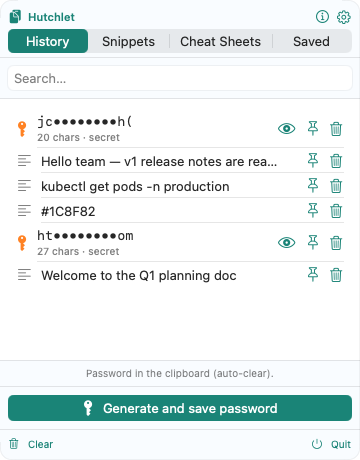
A clipboard often holds passwords, tokens, and card numbers. Hutchlet treats those as secrets: encrypted on your Mac, shown only as a masked preview, and revealed only behind Touch ID.
How a secret is detected
Detection runs entirely on-device with deterministic rules and heuristics — no AI, no remote model. Hutchlet spots:
- Passwords and high-entropy strings;
- API keys, private keys, and JWT tokens;
- Credit-card numbers.
It also respects apps that mark their content as confidential (the org.nspasteboard.ConcealedType pasteboard marker), so a password manager’s copy is treated as a secret automatically.
Masked preview
A secret is shown with only its first and last couple of characters revealed, plus context like its length and type:
ab••••yz · 24 chars · API keyThe plaintext is never written to disk and never shown until you authenticate.
Encryption & Touch ID
- Secrets are encrypted at rest with Apple CryptoKit (AES-256-GCM).
- The key lives in the Secure Enclave / data-protection Keychain (with a software fallback) and is unlocked with Touch ID.
- Reveal or Paste a secret and Hutchlet prompts for Touch ID first.
- Secrets are never added to searchable history.
If a secret was created with an old key it can’t be decrypted — Hutchlet will tell you to delete it and save a new one.