See your clipboard history on Mac.
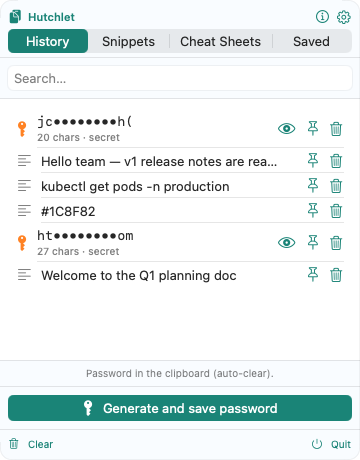
macOS only remembers the last thing you copied. Hutchlet keeps a searchable history of everything — text, links, images and files — and pastes the right one back with a single shortcut.
macOS 14+ · Apple Silicon · One-time purchase · No account, no tracking, no network.
Does macOS keep a clipboard history?
Not really. The built-in clipboard holds a single item — the last thing you copied. Copy something else and the previous one is gone, with no way to search or scroll back. A clipboard manager like Hutchlet adds the history the system leaves out.
Everything you copied, one shortcut away
Search the whole history
Type a few characters to find any clip — a link from this morning, a snippet from last week — and paste it straight back into the app you’re in.
Text, links, images and files
Not just text. Hutchlet captures images and files too, stores big items efficiently, and shows you a preview before you paste.
Secrets stay out of it
Passwords, API keys and card numbers are detected, masked and encrypted behind Touch ID — so a searchable history never exposes them. Why it’s private →
Keep what you want, clear it in one click
Smart retention keeps your most recent items and lets the rest expire; skip clips that are too large, and clear everything whenever you like. It all stays on your Mac — no cloud, no account.
Clipboard history questions
How do I see older copied items on a Mac?
Install a clipboard manager. Hutchlet keeps a searchable history of everything you copy and pops it open with a shortcut (⌘⇧V) or a mouse gesture — pick any past item and it pastes back.
Does clearing the history remove it everywhere?
Yes. History lives only on your Mac. Deleting an item — or clearing everything — removes it from your device; there is no cloud copy because nothing is ever uploaded.
Is my clipboard history private?
Completely. The current build has no networking entitlement, so it makes no network calls. Secrets are encrypted locally with Apple CryptoKit and revealed only behind Touch ID.
Give your Mac the clipboard history it’s missing
Search everything you copy, keep secrets encrypted, and paste the right thing every time.