How-to › Stop retyping commands
Stop retyping commands
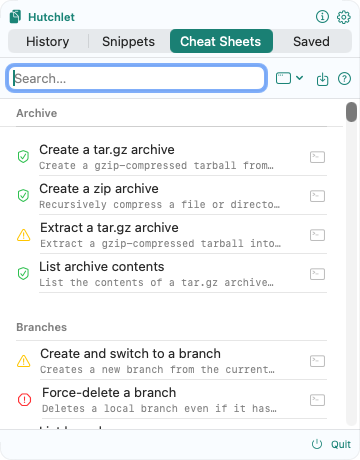
If you keep typing the same command with slightly different arguments — and occasionally fat-finger a flag — Cheat Sheets are for you. They make the command a template you fill in, preview, and paste.
Open Cheat Sheets
Summon the panel and switch to the Cheat Sheets tab. Pick a template from the catalog — each shows a risk and target badge.
Fill in the blanks
Enter the parameters in the form. Values can come from a preset, the clipboard, your selection, or history — and numbers and paths are validated as you type.
Preview the exact command
Hutchlet shows the rendered command with your values substituted and safely quoted. Read it. Nothing has happened yet.
Deliver it your way
Choose Copy or Paste without Enter into your terminal — then run it when you’re ready. Hutchlet never presses Enter for you by default.
Save it for next time
Bookmark the filled-in sheet to the Saved tab so you don’t even fill it in again.
Built-in guardrails
- Risk badges from Safe to Destructive warn you before you act.
- Forbidden-path validation stops a destructive template from pointing at
/or/etc. - A command that looks like production asks for extra confirmation.
The payoff: correct syntax every time, no typos in flags, and the same command your whole team uses — without memorising any of it.